
Building 'Nexus Share' with Kiro and Q Developer
One problem of social media
As some of you know I’m active on a few social media page - mainly Linkedin, but also X/Twitter, Bluesky, Threads. A problem that I’ve always had is that it takes a lot of time and energy t o get content spread out accross multiple pages, especially if you want to also mention friends or colleagues.
There are a few SaaS offerings for that already, but none of them really works for me. Or I would need to pay for it myself :-)
I’ve tried a few and some of them add branding (that I don’t want), others are hard to use, others are missing features… So I decided to try to build something myself and offer it as a SaaS solution :-)
So I’ve built Nexus Share.
A lot of learnings already
I’ve had this idea for a longer while, but it really kicked off when I got my Q developer licence and when I started to play around with Kiro. As most of my recent projects, I’m focussing on making this a multi-platform application using Flutter. But this time, the application needs a proper backend, using serverless technologies - GraphQL, Lambda, Eventbridge, DynamoDB, …
I’ve already learned a lot since I started to build this - how to guide the agents to work efficiently in a more complex setting, how to teach flutter to read the proper backend configuration, how Amplify Flutter SDK handles OAuth2 credentials, …
How I built what Nexus Share is today
When I started this project, I was using AWS Q Developer for most of my development tasks. Throughout the project, I got access to Kiro and started to use it for a lot of the bigger features. Since we are able to pay through the AWS Identity Center (IDC) for Kiro, I’ve migrated my Q Developer Subscription to use it with Kiro. Let’s see how long it lasts.
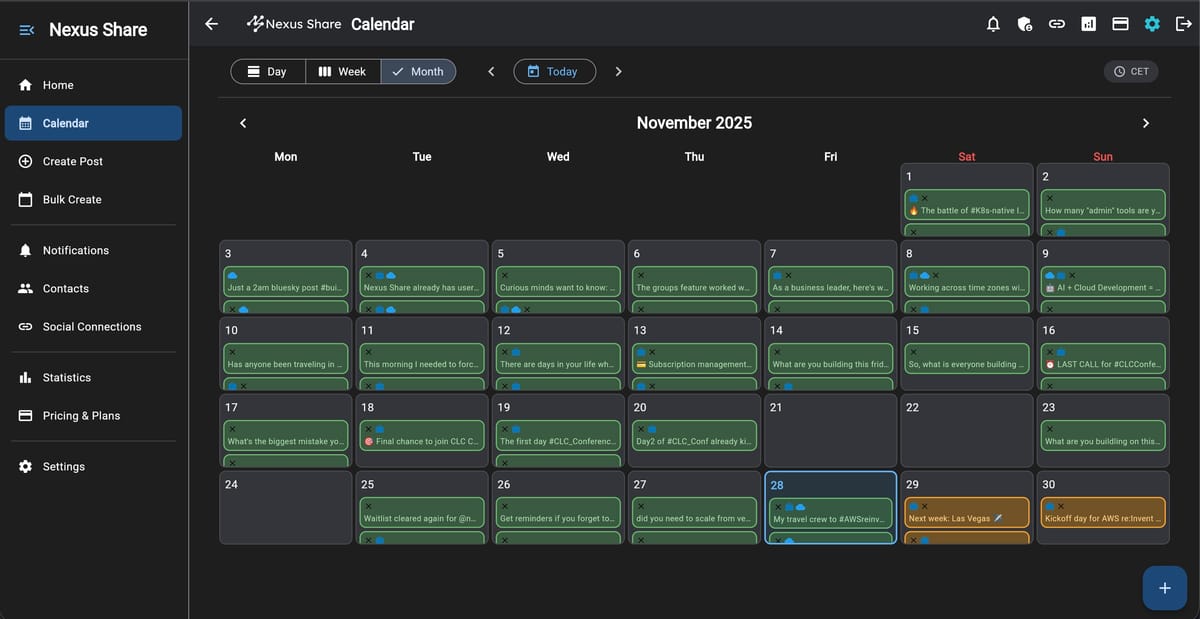
Both tools are very powerful in creating all kind of code - as long as you steer them correctly and makethe tasks small and understandable. The calendar view that we just launched was created by Kiro within 60-90 minutes - and I needed to only prompt it once for the “Specs” of the calendar view. Of course, afterwards a few changes and improvements where required, but the whole feature was ready within less than 24 hours!
What Nexus Share can do for you today
A few weeks ago Nexus Share officially “launched” - we already have sent out more than 100 invites to join the application!
You can use Nexus Share to post, plan and schedulue social media pressence accross X/Twitter, LinkedIn and Bluesky. You can write single-posts to one or multiple social networks or you can schedule up to 10 posts at once.
AI helps you to write better posts, to indlude appropiate tags or to schedule posts at the perfect point in time. AI supports you to write different types of posts and you can get detailed analytics about your usage.
Since earlier this week, Nexus Share allows you to switch to a different time zone…and while you’re reading this, we have just lauched “Calendar View” that shows all of your past and future posts on a calendar.
The Leaderboard & User Cards can be shared to show how active (or inactive) you are.
Nexus Share calculates and keeps track of you posting and activity streak and can also send you reminders if you are not holding up with your own “goals” of number of posts.
Nexus Share has evolved to a pretty powerful model - and you are able to choose between a free plan and three different paid plans: pro, business, enterprise.
The application is not only available on the web, you can also use it and access your subscription on iOS and Android - as we have a mobile app that you can use.
The vision
When I started to build this application I wanted to solve my very own problem of marketing my YouTube channel. I’ve achieved the original goal of having a tool to self-market my created content. The tool can obviously be used not only for YouTube, but also for any other type of content.
Architecture overview
This project is composed of 2 main components:
- the Backend that exposes a GraphQL API
- the Frontend that exposes a Web Interface interacting with the GraphQL API
Backend
The Nexus Share backend is deployed as GraphQL API using AWS Serverless technologies:
- AWS AppSync to provide the GraphQL API
- AWS Lambda for business logic and integration with social networks
- Amazon DynamoDB for data persistence
- AWS Cognito for Authentication and Authorization
- AWS CloudFront for content delivery
- Amazon Bedrock for AI-powered content enhancement and generation
- Content enhancement and optimization for different social networks
- Post generation from topics and prompts
- Tone adjustment (professional, casual, engaging)
- Hashtag and mention suggestions
- Multi-language support with usage limits by tier
The AWS Cloud Development Kit (CDK) provides the infrastructure-as-code used to deploy to a live AWS environment. You can find all of the above under the ‘/backend’ folder in the repository.
Frontend Application - Web
- Technology: Flutter Web
- Hosting: Amazon S3 + CloudFront
- Authentication: AWS Cognito
- API Communication: AWS Amplify
Frontend Application - Android and iOS
- Technology: Flutter
- Hosting: N/A
- Authentication: AWS Cognito
- API Communication: AWS Amplify
The frontend application provides a responsive user interface for:
- Creating and editing posts
- Scheduling posts for future publication
- Managing social network connections
- Viewing post history and analytics
System Architecture
graph TB
    subgraph "Client Layer"
        User[User Browser]
        Flutter[Flutter Web App]
    end

    subgraph "CDN & Hosting"
        CloudFront[AWS CloudFront]
        S3Web[S3 Static Hosting]
    end

    subgraph "API Gateway"
        AppSync[AWS AppSync<br/>GraphQL API]
    end

    subgraph "Authentication"
        Cognito[AWS Cognito<br/>User Pool]
        OAuth2[OAuth2 Service<br/>PKCE Flow]
    end

    subgraph "Compute Layer"
        Lambda1[Lambda Functions<br/>Post Management]
        Lambda2[Lambda Functions<br/>Social Publishing]
        Lambda3[Lambda Functions<br/>Scheduling]
        Lambda4[Lambda Functions<br/>Webhooks]
    end

    subgraph "AI Services"
        Bedrock[Amazon Bedrock<br/>Content Enhancement]
    end

    subgraph "Data Layer"
        DynamoDB[(DynamoDB<br/>Posts, Users, Contacts)]
        S3Media[S3 Bucket<br/>Media Storage]
    end

    subgraph "External Services"
        Stripe[Stripe<br/>Payments]
        LinkedIn[LinkedIn API]
        Twitter[X/Twitter API]
        Bluesky[Bluesky API]
        Threads[Threads API]
        Mastodon[Mastodon API]
        Slack[Slack API]
    end

    subgraph "Monitoring"
        CloudWatch[CloudWatch<br/>Logs & Metrics]
        RUM[CloudWatch RUM<br/>Frontend Monitoring]
    end

    User -->|HTTPS| CloudFront
    CloudFront -->|Serve Static Assets| S3Web
    CloudFront -->|Cache| Flutter
    Flutter -->|GraphQL Queries/Mutations| AppSync
    Flutter -->|Auth Requests| Cognito
    Flutter -->|OAuth2 Flow| OAuth2
    Flutter -->|Performance Metrics| RUM

    AppSync -->|Authorize| Cognito
    AppSync -->|Invoke| Lambda1
    AppSync -->|Invoke| Lambda2
    AppSync -->|Invoke| Lambda3
    AppSync -->|Invoke| Lambda4

    Lambda1 -->|Read/Write| DynamoDB
    Lambda1 -->|Upload Media| S3Media
    Lambda1 -->|Enhance Content| Bedrock

    Lambda2 -->|Publish Posts| LinkedIn
    Lambda2 -->|Publish Posts| Twitter
    Lambda2 -->|Publish Posts| Bluesky
    Lambda2 -->|Publish Posts| Threads
    Lambda2 -->|Publish Posts| Mastodon
    Lambda2 -->|Publish Posts| Slack

    Lambda3 -->|Schedule Events| DynamoDB
    Lambda4 -->|Process Webhooks| Stripe

    OAuth2 -->|Store Tokens| DynamoDB
    OAuth2 -->|Authenticate| LinkedIn
    OAuth2 -->|Authenticate| Twitter
    OAuth2 -->|Authenticate| Bluesky
    OAuth2 -->|Authenticate| Threads
    OAuth2 -->|Authenticate| Mastodon
    OAuth2 -->|Authenticate| Slack

    Lambda1 -->|Logs| CloudWatch
    Lambda2 -->|Logs| CloudWatch
    Lambda3 -->|Logs| CloudWatch
    Lambda4 -->|Logs| CloudWatch

    style Flutter fill:#02569B
    style AppSync fill:#FF9900
    style Cognito fill:#DD344C
    style DynamoDB fill:#4053D6
    style Bedrock fill:#FF9900
    style CloudFront fill:#8C4FFF
Frontend Architecture
graph TB
    subgraph "Presentation Layer"
        Screens[Screens/Pages]
        Widgets[Reusable Widgets]
    end

    subgraph "State Management"
        Providers[Provider State]
        Models[Data Models]
    end

    subgraph "Business Logic"
        AuthService[Auth Service]
        PostService[Post Service]
        OAuth2Service[OAuth2 Service]
        MediaService[Media Service]
        FeatureFlagService[Feature Flag Service]
        ThemeService[Theme Service]
    end

    subgraph "Data Access"
        GraphQLClient[GraphQL Client<br/>Amplify]
        LocalStorage[Local Storage<br/>SharedPreferences]
    end

    subgraph "External APIs"
        AppSyncAPI[AppSync GraphQL API]
        CognitoAuth[Cognito Auth]
        S3Storage[S3 Media Storage]
    end

    Screens -->|Use| Providers
    Widgets -->|Use| Providers
    Providers -->|Manage| Models

    Providers -->|Call| AuthService
    Providers -->|Call| PostService
    Providers -->|Call| OAuth2Service
    Providers -->|Call| MediaService
    Providers -->|Call| FeatureFlagService
    Providers -->|Call| ThemeService

    AuthService -->|API Calls| GraphQLClient
    PostService -->|API Calls| GraphQLClient
    OAuth2Service -->|API Calls| GraphQLClient
    MediaService -->|Upload| GraphQLClient
    FeatureFlagService -->|Cache| LocalStorage
    ThemeService -->|Persist| LocalStorage

    GraphQLClient -->|Query/Mutate| AppSyncAPI
    GraphQLClient -->|Authenticate| CognitoAuth
    GraphQLClient -->|Upload Files| S3Storage

    style Screens fill:#02569B
    style Providers fill:#4CAF50
    style AuthService fill:#FF9800
    style GraphQLClient fill:#2196F3
Cards and Leaderboards & Join page
We are also hosting a “Join” page for quicker loading times under the same CloudFront instance as the Flutter Web page - Join page. This page is built using Angular and it connects to the GraphQL API using the Amplify SDK.
In addition to that there is the page that we have: Leaderboard & User Cards
This is a different CloudFront instance that also hosts an Angular application - which then loads the already generated profile cards from the S3 backend and displays the leaderboard and statistics and information about the users. Also here we’ve choosen Angular because it loads faster than Flutter.
Next steps
What’s next? I would like to continue to grow the user base and get more people to try out if the toolworks for them. I am aiming to get offer the service for free for a bunch of the AWS Community (Community Builders, Heroes, User Group) - if you are part of one of these groups and would like to give it a try, please reach out to me personally.
Also I would like to optimize the used prompts under the hood and the User Experience.
I’ve been asked to provide an API (GraphQL or REST) - would you be interested in using that to coordinate your social media posts? Please let me know.
How to get involved
Join the waitlist, once you are invited set up an account, connect your social media accounts and start posting.
And then, start giving feedback.
Use the in-app feedback system to provide feedback on what is or what is not working well. If you have ideas on how to improve the User Experience or if you find anything that could be simpler - LET ME KNOW!